移交会将所选照片导入 Capture One。在 Mac 上由你选择目录或会话;在 Windows 上,移交会打开 Capture One 自己的“导入”对话框。
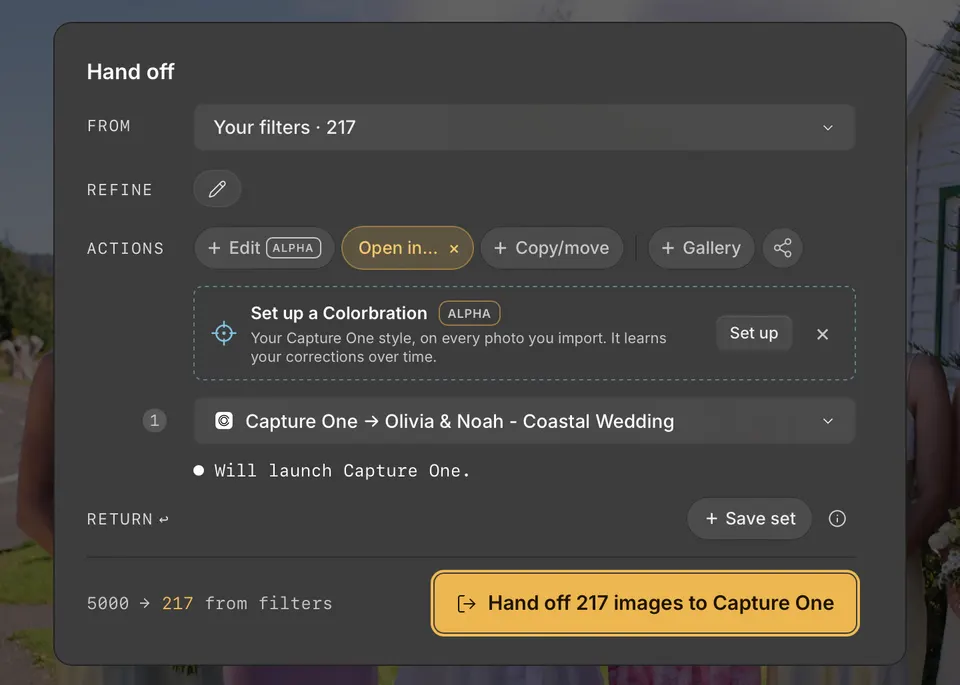
在 Mac 上
- 按 H 打开移交,然后使用“来源”和“细化”选择要发送的照片。
- 在“操作”下点击“打开方式…”,然后指向 Capture One。
- 选择已打开的文档、最近使用的目录或会话、“选择现有项目…”或“+ 新建目录…”。
- 点击移交按钮,例如“将 217 张图像移交给 Capture One”。
Cullibrate 会将照片导入该文档。在目录中,文件会保留在原位置;在会话中,文件会导入到会话文件夹。已在文档中的照片会被跳过,Capture One 切换到前台时,导入的照片会处于选中状态。
在 Windows 上
- 在“操作”下点击“打开方式…”,然后选择 Capture One。
- 点击移交按钮。Capture One 会在所选照片所在的文件夹中打开“导入”对话框。
- 选择要导入的照片,并在 Capture One 中完成导入。
随照片一起传递的内容
Capture One 会从 Cullibrate 在你筛选时保存的 XMP 中读取评分和颜色标签。Cullibrate 的已标记和已拒绝选择没有可供 Capture One 读取的对应字段。