New in 0.9.0
Assisted culling is here
Best first
More natural stacks, with the stronger frames first.
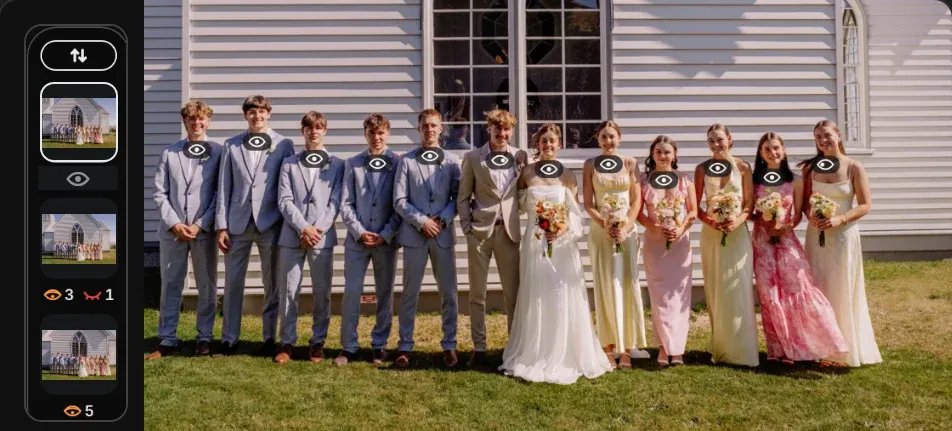
Eye state
Spot blinks and downward glances across the group.
Focus
Filter and sort by subject focus to find sharper frames.
New features
- Preview Edits now shows more of your edit, more accurately: profiles, Looks, tone curves, HSL, color grading, black & white and As Shot white balance.
- Choose rounded, balanced or square corners in Appearance.
- Colorbrations now support Capture One on macOS and Windows, as an experimental option.
Improved in 0.9.0
Image display, truly fast.
Less waiting between you and the next frame. Faster browsing, including Preview Edits.


Improvements
- Improved fallback RAW rendering, with Adobe DNG Converter support when camera previews are missing or too small.
- Survey mode: zoom to faces with Space and zoom individual photos with Option/Alt + mouse wheel.
- Choose whether arrows go straight to the next photo while zoomed in. You’re asked the first time.
- Cmd/CtrlL switches filters off and on again; ShiftCmd/CtrlL clears them.
- Camera sort and the Camera filter tell apart two bodies of the same model.
- Filenames now show paired formats, such as P101.ORF+JPG.
- Automatically eject camera cards after copying, with your preference remembered for the next import.
- Choose how long to hold an arrow key before photos start moving.
- Display & Performance settings add a limit for each disk cache, memory and preloading options, and photo analysis speed.
- Browse folders directly from the collapsed Library sidebar, and collapse every location at once from its header.
- Missing originals are easier to resolve, with options to locate the files or remove missing photos from the collection.
- macOS: When removing photos copied from Apple Photos, choose whether to delete their originals too.
- Choose what Delete does the first time you use it: remove photos from the collection, move them to a Rejects folder, or send them to the Trash.
- Copy or Move now brings custom transfers and saved Quick Actions together.
- The Photo Mechanic keyboard preset now matches your setup when its number keys set star ratings.
Minor improvements & bug fixes
- Fixed Handoff so copying or moving finishes before editing or opening files in another app.
- Fixed Lightroom Handoff while Lightroom is still importing an earlier batch. Slow waits now show, and Handoff stops if Lightroom quits.
- Fixed stalls when opening collections or reviewing large selections in Survey.
- Fixed Survey arrow-key navigation in larger selections and Face Survey.
- Fixed Lightroom exports beside RAW originals: crop and rotation no longer apply twice, and deleting, moving or copying the RAW leaves the export where it is.
- Fixed photos saved over by another app not showing again.
- Fixed import forgetting a drive or NAS destination while it is unmounted.
- Fixed clearing a filter in Grid moving away from the selected photo.